Posts

Showing posts with the label Class Presentations

3-22 A final push

Image
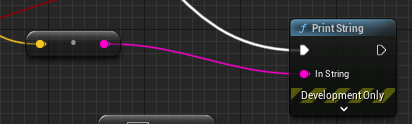
 So, did those changes from the last post work? No, but hopefully we can get that to change. For starters, I need to find out what the speed is reading.  This print string node I found will show it on the screen, and it's showing as (0,0,0), which tells me the blueprint is not looking at the right thing. Or, maybe it is? I'm not sure exactly, and after testing some of the other nodes and doing a little research, I landed on this thread from the unreal forums: https://forums.unrealengine.com/t/how-to-i-get-motion-controllers-velocity/97140 and I decided to test the world position of the controllers, which did show up and update so, trying that looks like this: and surprisingly, it works sort of. It outputs around 2 in the Z when I do the reeling motion, so that should be what I need to use when looking for that. The next step was to hook that up to the temporary delete which looks like this:  With the AND node looking at the collision. Now it is time to test this, and... I...
3-9 Recap and Timeline

 With two weeks left, I felt it would be a good time to explore what I plan on doing for the rest of this project, in addition to what I was able to get done during this presentation cycle.  Most Recent Video:                                        The Next Two Weeks:  Week 1: Getting Reel In Logic working and doing little visual things while researching motion controls Week 2: Implement motion controls

3-8 Flying Fish and Reeling it In

Image
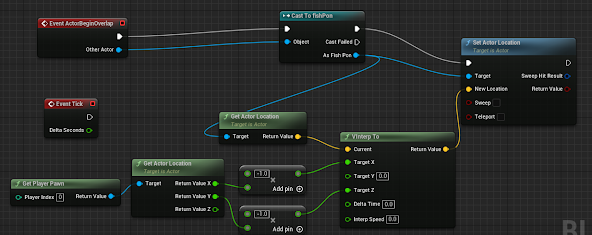
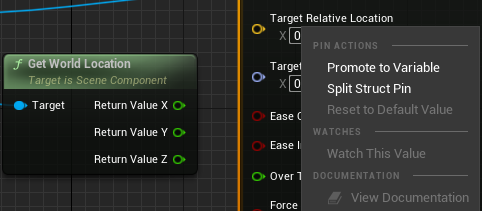
To start on some cleanup this week, I wanted to address the fish floating to the bobber. In my research, I found out about the split struct pin option when you right-click on certain options in blueprints. In this case, splitting it was able to split the locations in the level script into the X Y, and Z coordinates.    Initially, I tried plugging in the X and Z values as normally Y is the vertical axis (the axis I do not want to track) but in Unreal, Z is the vertical axis so as shown below, attaching the X and Y stops the fish from tracking vertically.  The next was a plan to try and get a placeholder catch in, and to do this I wanted to use one of the existing mappings to "pull" the fish in. After looking it up and seeing the project Input settings were the place to start mapping the button, I had to dig through the VR Template to find a button I could use. I initially planned on using one of the triggers, but I remembered that triggers were used to grab objects, So I s...

3-6 Fish on the Line

Image
  Based on the plan, it was time to start getting this last mechanic into the game, starting with getting the fish to move in the other direction. The first thing I did was get back to looking things up and got some help from the Unity forums.  https://forums.unrealengine.com/t/how-do-i-make-a-blueprint-object-move-away-from-another-object/448076/4 Using this as a jumping-off point, the first test I went through was this:               Turns out, a quick connection in the level script was all I really needed to get it to move back: The next thing is to bring the bobber back with the fish.  As it turns out, there is an "Attach Actor to Component" which lets you pick the parent and child, so using the same collision that I set up to delete the fish earlier, I was able to put this together: It wasn't quite working right but changing the location and rotation rule to "Snap to Target" got the bobber moving with the fish. Here's a look at...

2/23 - First Fishing Rod

Image
I met my goals for this week more so then I thought I would. There are some not-great parts of whats in there that still needs some work, but for the most part, what I wanted to get into there for the week is in there.      Once I got over getting the fish to move around, the next step was getting a fishing rod to try and be able to grab and move around in VR. This is the point where my research led me to UE's rope tool, and a video that helped me a lot was this one: https://youtu.be/ikTujgYI_Io From that tutorial and getting everything set up, I was able to get a very simple system in place that resembles fishing as seen below: This was achieved by having a grabbable cylinder with a cable and ball attached to it, all with a physics constraint. The purely white ball is a "fish" that using the level blueprint moves to the bobber; the ball with a gradient on it. On the bobber, there is a cast that finds the fish's blueprint that then deletes that fish when they collide....

2/9 Pt. 2 - Presentation

Image
 Original Plan: Making a VR project in Unreal, hand-coding the controllers Pros: New software Relearning C++ Cons: I know nothing about Unreal New Plan: Making a VR Fishing game where  -The fish is controlled by someone else with a phone using OSC - Project is in UE5 now - Logic Done with Blueprints Current Timeline: This week:  I'm going to familiarize myself with Unreal and its VR package, I will also try to build a small scene in the engine. Next Week:  Next week I will work on the actual fishing controls and get everything working Week 7:  I will work on getting the fish into the pond and making the player able to catch them Week 8:  This week will be dedicated to refining what is already in the game (Mechanics and assets) Week 9:  This week will be for getting the fishing moving with the phone Week 10:  This will be for the finishing touches. This week: where I want to be kinda.     Coming up: OSC Implementation: Also, the Actual fi...